Immigration Command Centre

Run your whole practice. Learn it in an afternoon.

One calm place for every client file, document, IRCC form and deadline, with AI that does the paperwork and leaves the decisions to you.

  • 7-day free trial
  • Prices in CAD
  • Built for RCICs and immigration lawyers in Canada
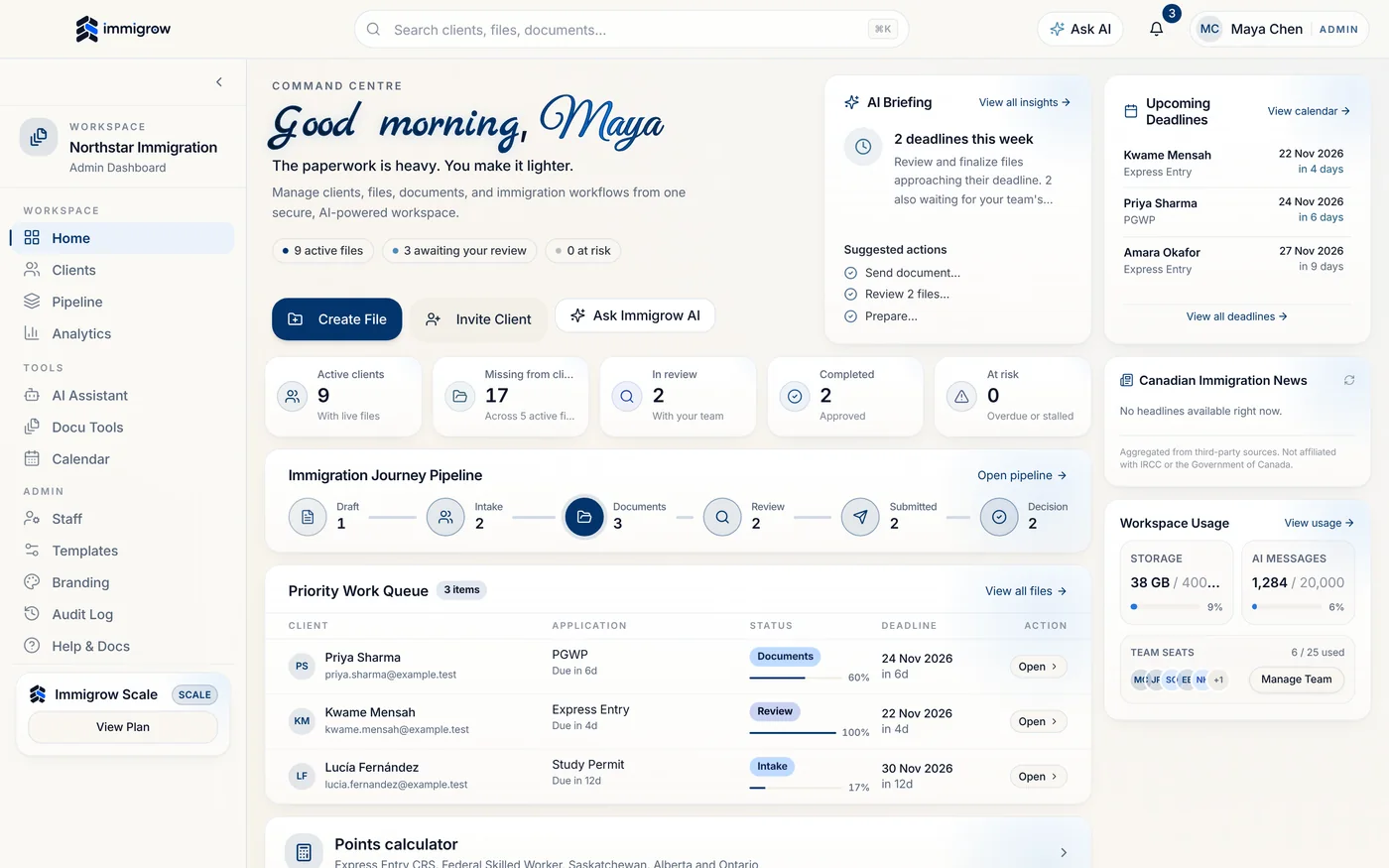
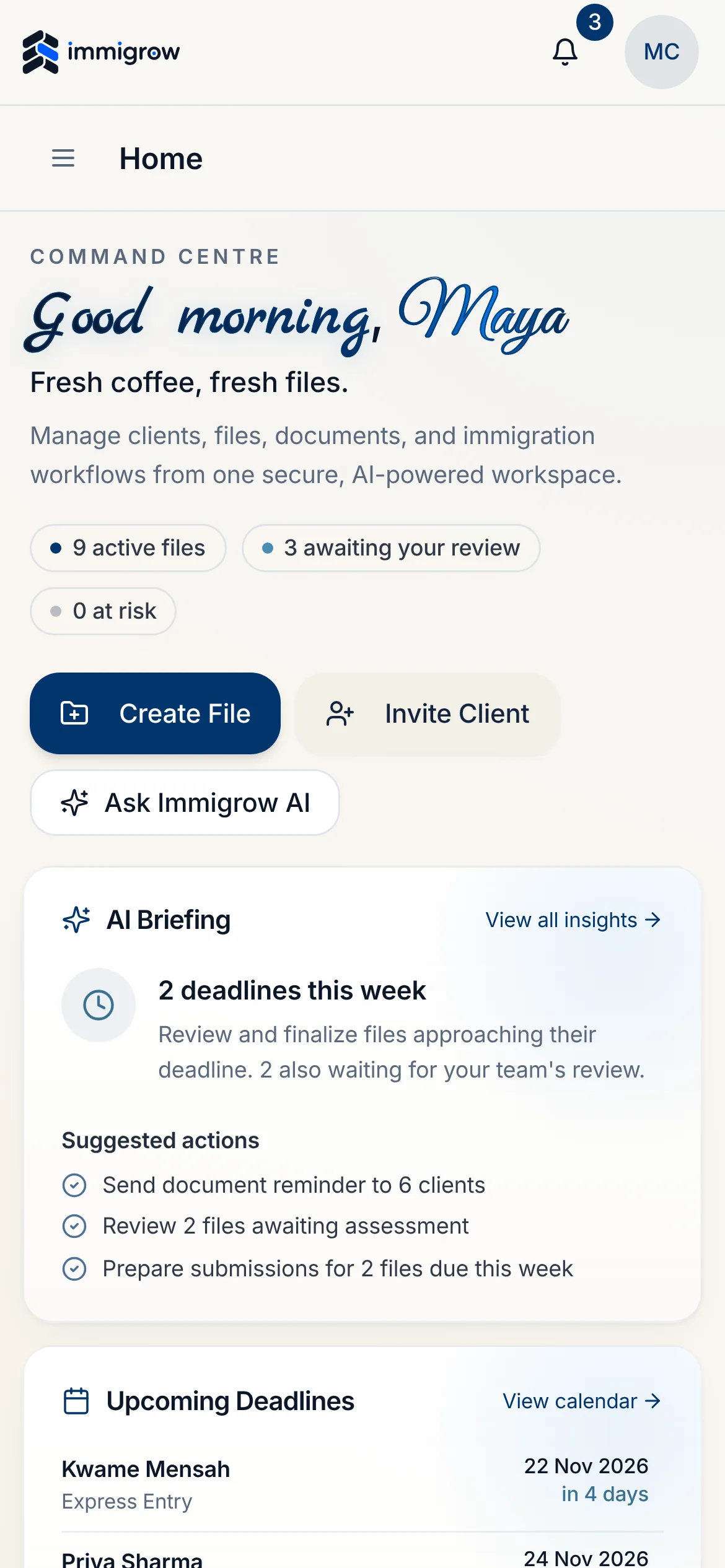
The Immigrow home dashboard: a morning greeting, AI briefing, upcoming deadlines, the case pipeline and the priority work queue The Immigrow home dashboard on a phone
Scanner result: Surname SHARMA, read with 99% confidence, ready to confirm
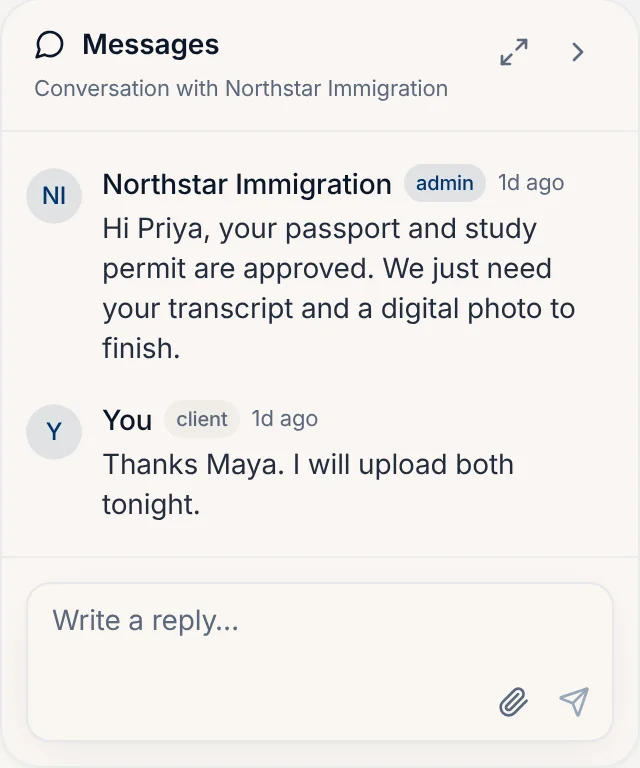
A message thread between the firm and a client in the client portal
  • Express Entry
  • Study Permit
  • PGWP
  • Spousal Sponsorship
  • Work Permit
  • Visitor Visa
  • PR Card Renewal
  • Citizenship
  • Visitor Record
  • Study Permit Extension

The old way

Documents in five inboxes. Forms typed by hand. Clients asking for updates.

Immigrow puts the whole practice in one calm place, and it takes an afternoon to learn.

See how it works

01 The command centre

One workspace for every client file.

If you can use email, you can use Immigrow. Every screen below is the real product.

01 / 04

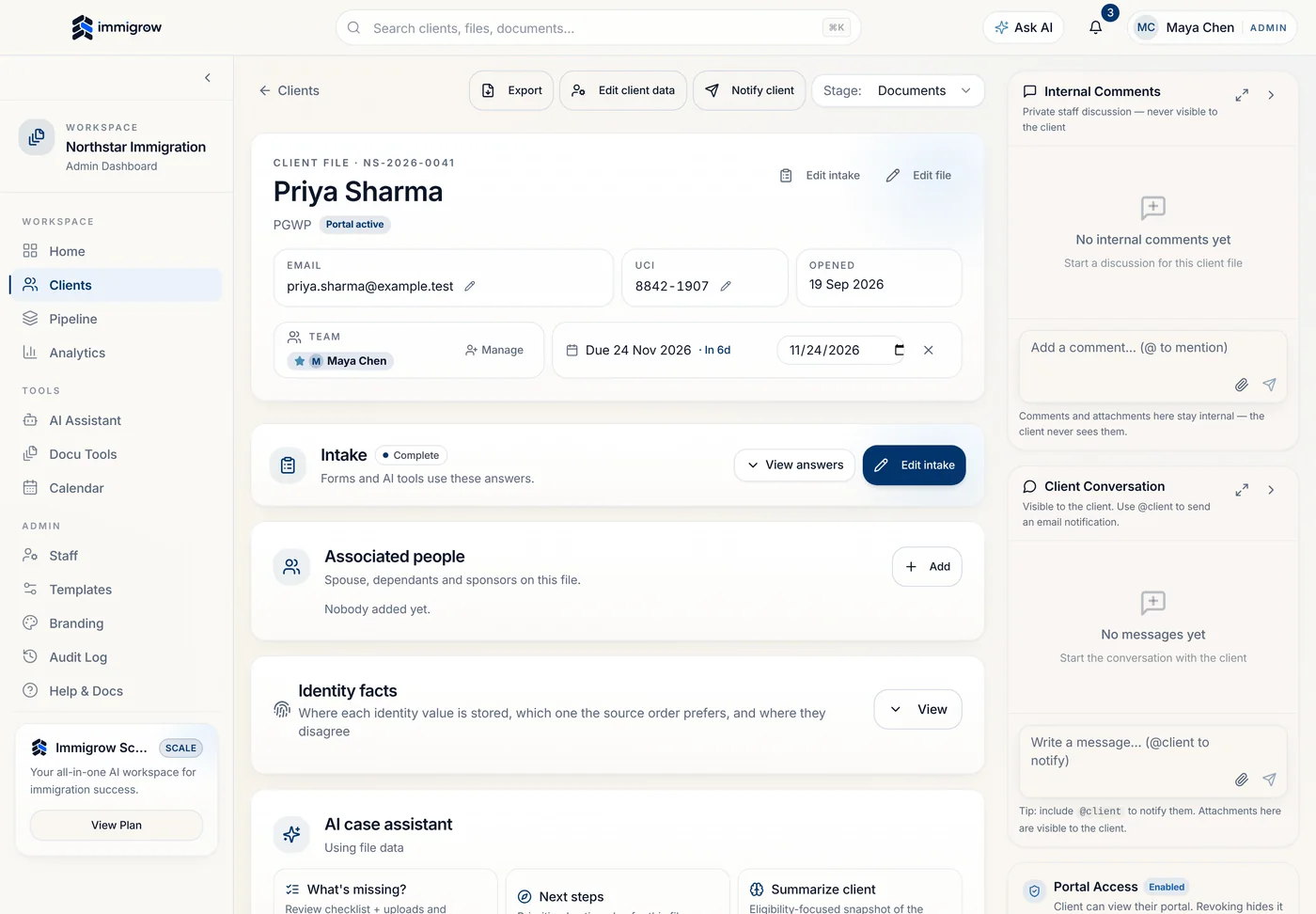
Every client file on one screen.

Intake, documents, forms, notes, messages and the deadline live together. Nothing in a side folder, nothing in someone’s inbox.

  • Document checklist with approve and reject
  • Spouses, children and co-applicants on the same file
  • Private staff notes beside the client conversation
A client file in Immigrow showing the client’s details, intake status, AI case assistant and comments
02 / 04

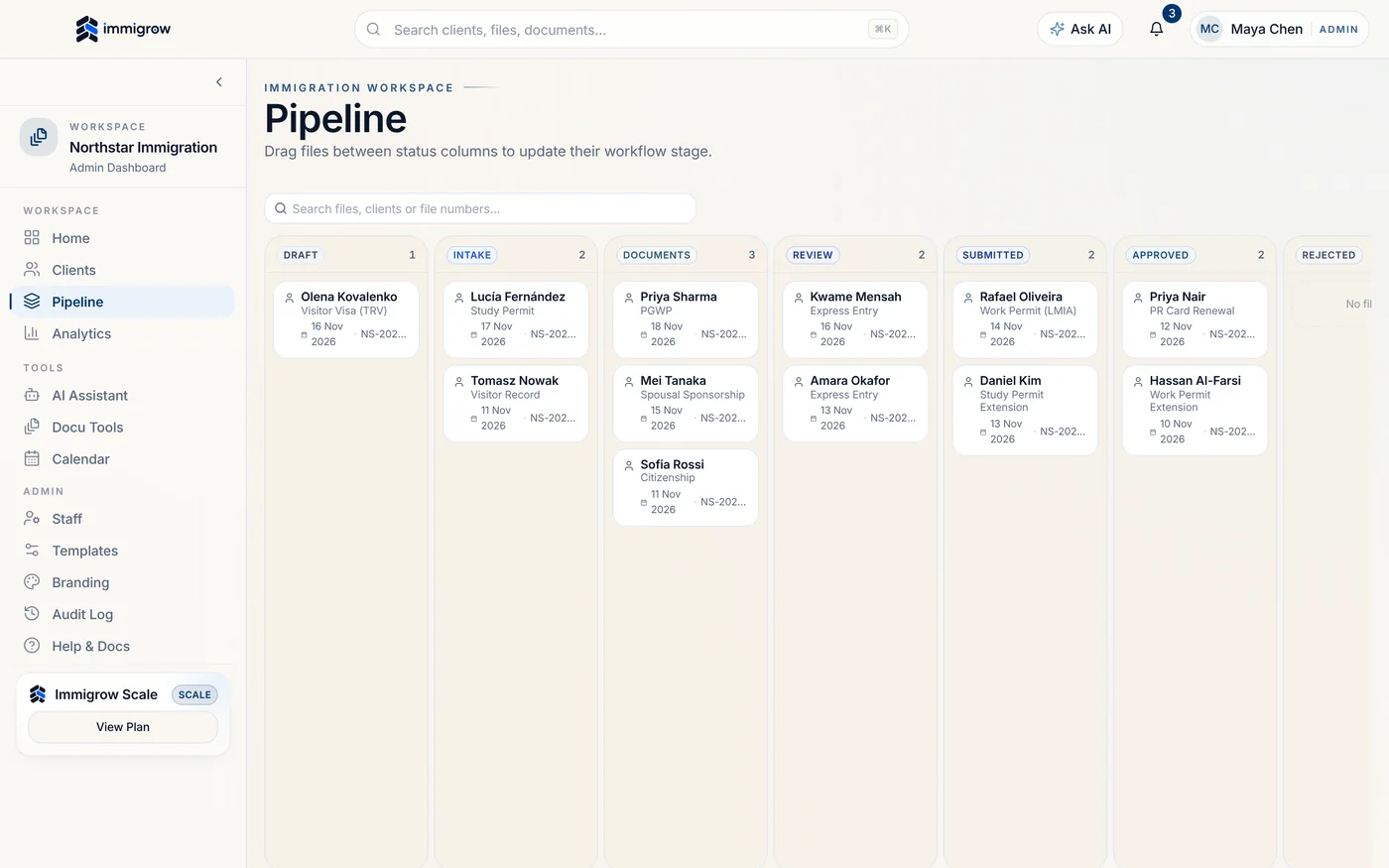
See every case by stage.

Draft to decision in one board. Drag a file forward when it moves, and the whole team sees it.

  • Draft, intake, documents, review, submitted, decision
  • Deadlines shown on every card
  • Closed files stay on record, ready to reopen
The Immigrow pipeline board with client files grouped by stage
03 / 04

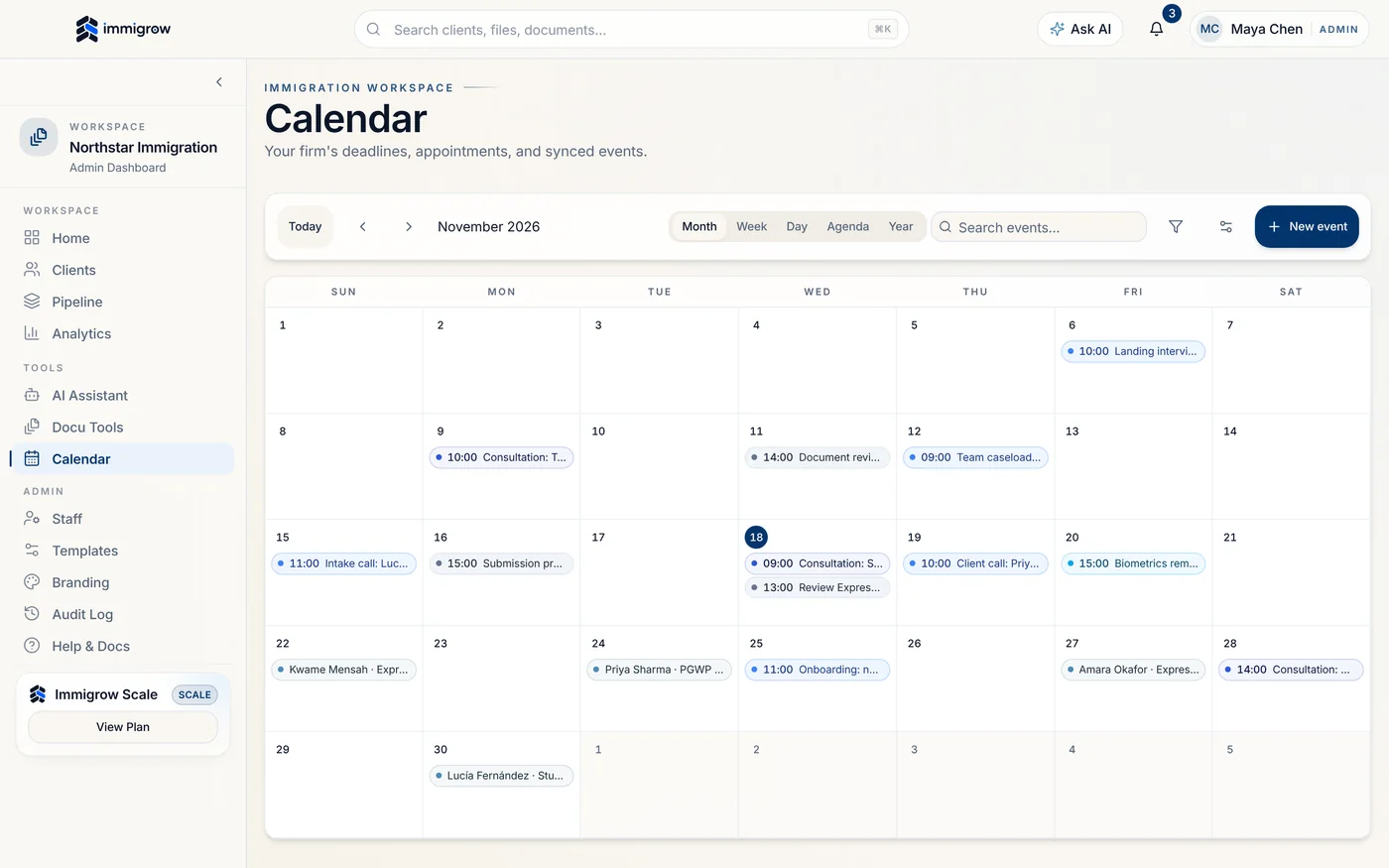
Deadlines that follow you.

Appointments and file deadlines sit on one calendar and sync both ways with Google Calendar.

  • Two-way Google Calendar sync
  • File deadlines appear automatically
  • Month, week, day and agenda views
The Immigrow calendar showing consultations, tasks and file deadlines for the month
04 / 04

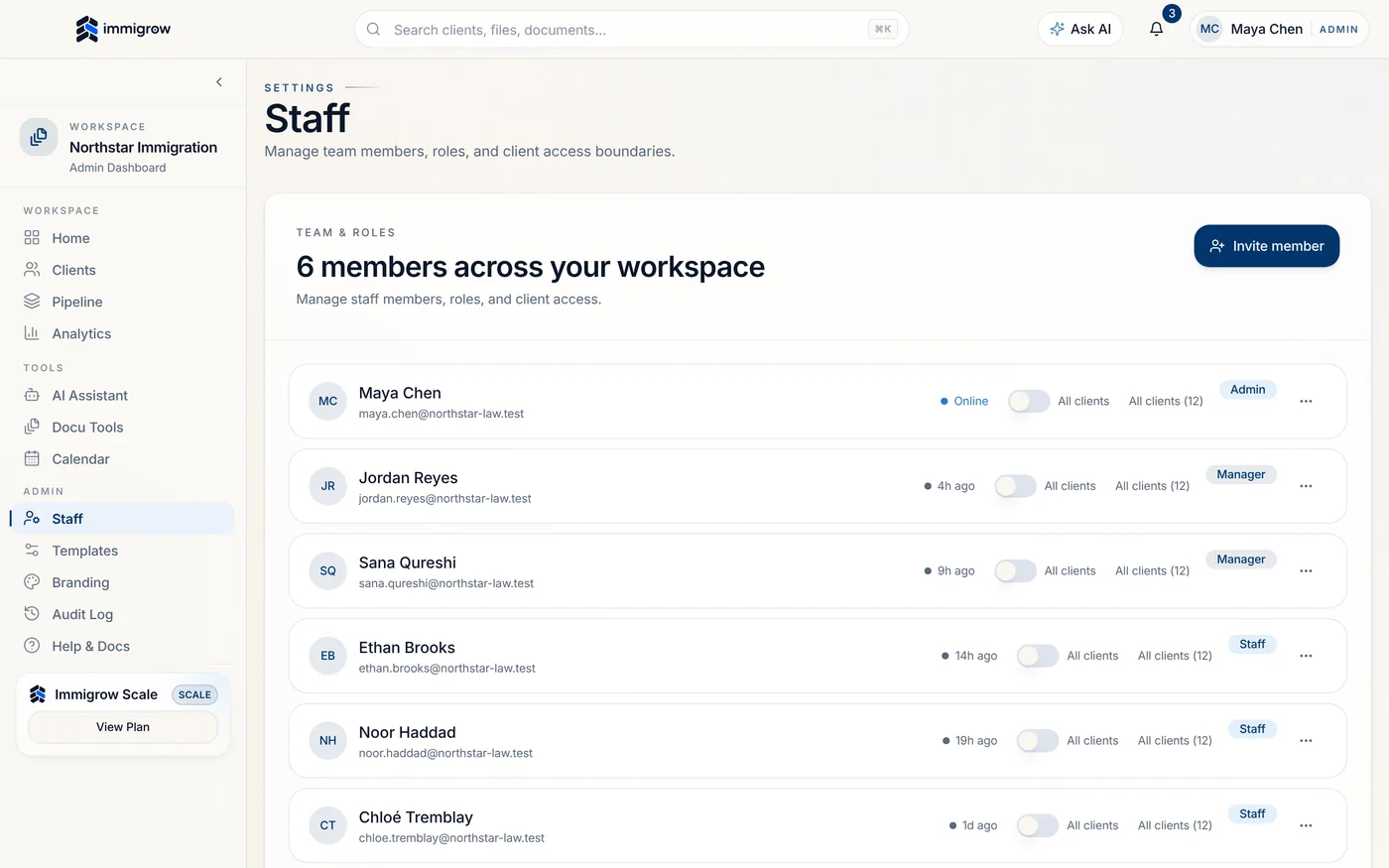
Everyone in the right seat.

Invite your team, set who manages whom, and choose which clients each person can see.

  • Admin, manager and staff roles
  • Assign files to people
  • A log of who did what, and when
The Immigrow staff page listing team members with their roles and client access

02 AI that does the paperwork

The AI reads and types while you make the call.

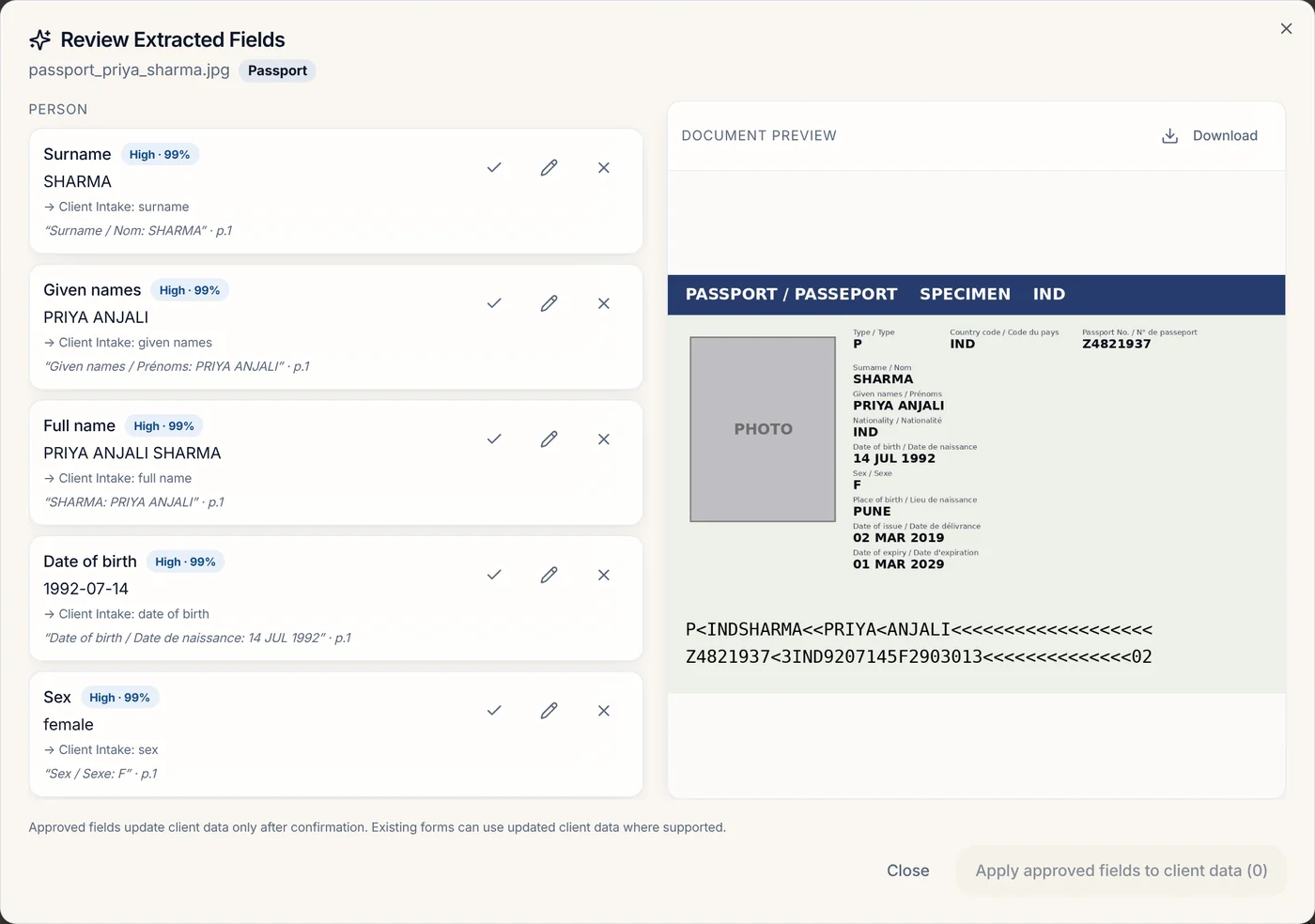
Drop in a passport or a permit. Immigrow reads it, shows you every field next to the original, and saves nothing until you confirm.

  1. Upload the document
  2. Check each field against the original
  3. Approve, and it lands on the file
Immigrow’s scanner review: surname, given names, date of birth and sex read from a specimen passport, each with a confidence score and approve, edit and reject buttons, beside a preview of the document
100%of names and UCI numbers read correctly in our internal tests
97%of dates read correctly, including blurry and low-resolution scans
0fields saved to a file without a person confirming them first

Internal tests on a synthetic document set, November 2026. Not a guarantee. Always check the result against the original.

Document scanner

Drop in a passport, permit or ID. Names, dates, document numbers and UCI are read for you, and you confirm before anything is saved.

On every plan

IRCC form autofill

Fill IRCC PDF forms straight from the client file. No retyping. Starting with IMM 5257, IMM 5710 and IMM 5476.

On every plan

AI assistant and CRS helper

Ask about a file or a rule in plain English, right inside the file. Check a CRS score in seconds.

On every plan

AI Doc Maker

Draft letters and documents from what is already on the file, then review and approve.

On every plan

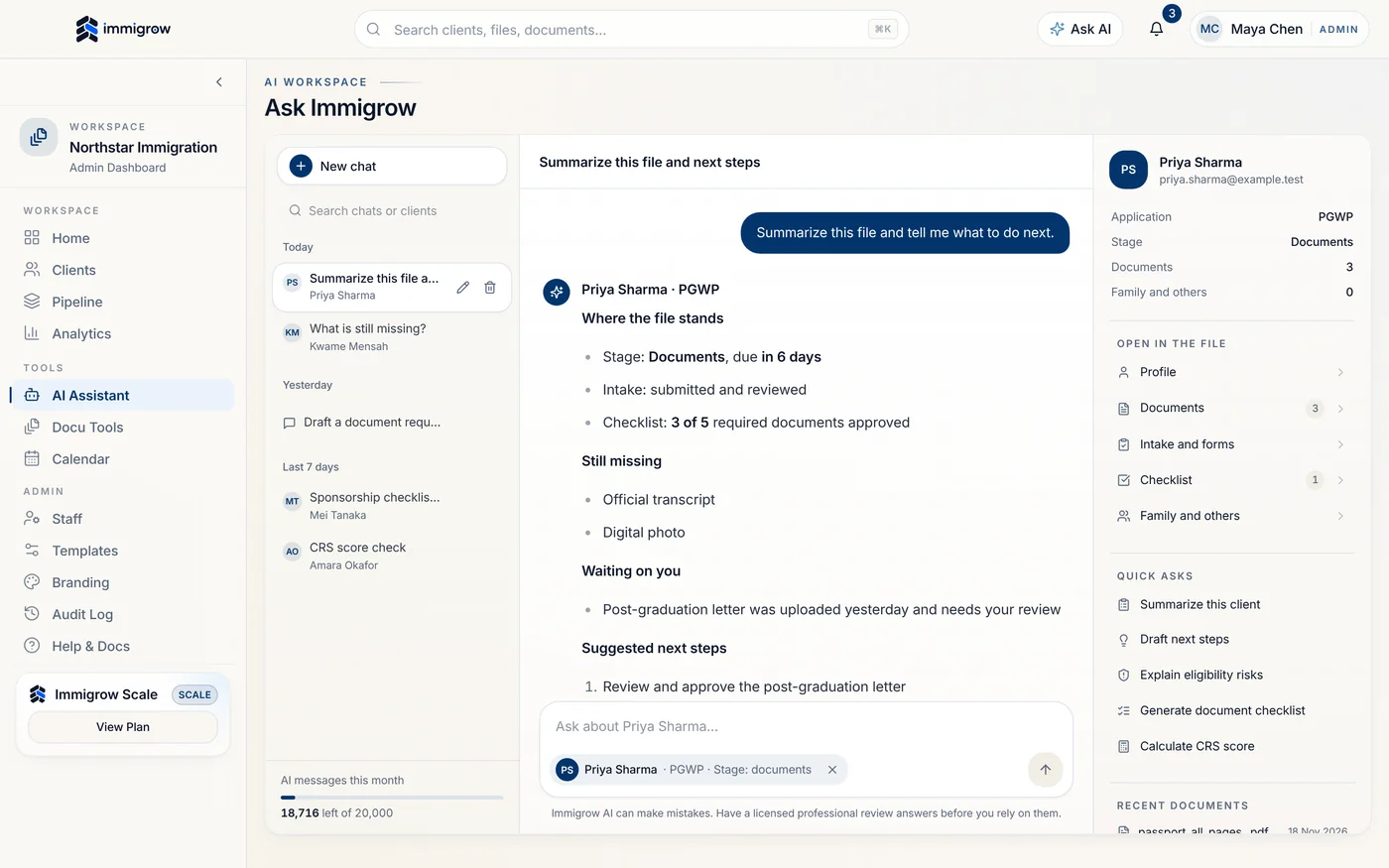
Ask about a file in plain English.

Pick a client and ask. The assistant answers from what is on the file: what is done, what is missing and what to do next.

  • One-click file summary and next steps
  • Draft a document request or a letter
  • Every answer is a draft for a licensed professional to review
The Ask Immigrow workspace summarising a client file: stage, missing documents and suggested next steps

Client files never go into a public AI chat.

AI runs inside Immigrow, only on the file you are working on, and staff review every result. The AI drafts and suggests. It does not give legal advice and it does not replace you.

Read the AI disclaimer

On the way

  • AI agent with approvals inbox Coming soon
  • Daily AI briefing Coming soon
  • E-sign for retainers Coming soon
  • Firm letterhead Coming soon
  • IRCC-ready document packs Coming soon
  • WhatsApp to clients Coming soon
  • Outlook calendar sync Coming soon

03 Client portal

Your clients do their part with no email chase.

Each client gets a free login by email. They see exactly what you need from them, upload it from their phone, and watch their application move.

  • A checklist of what is needed, and what is already approved
  • Guided intake, reviewed by staff before it lands on the file
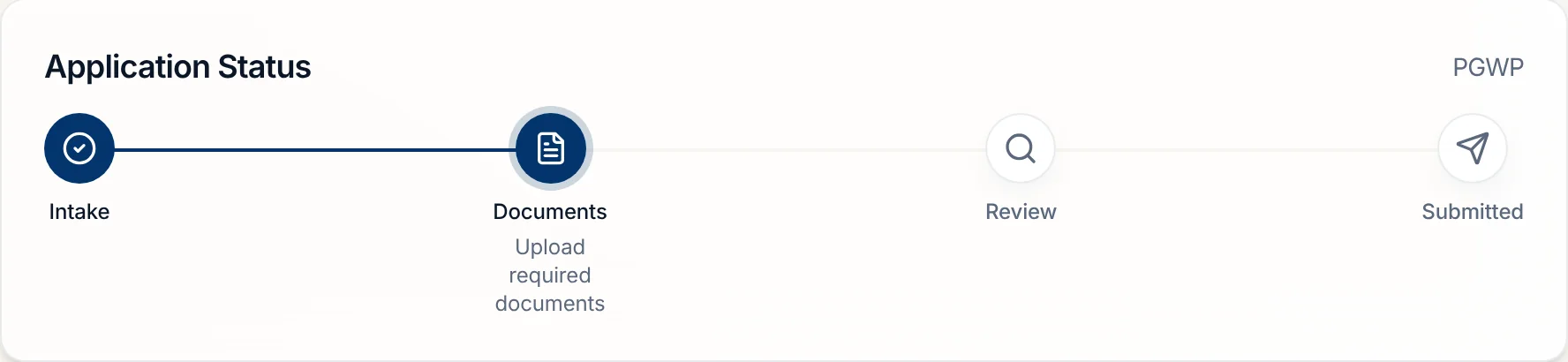
  • A status tracker, so fewer “any update?” emails
  • Spouses and children get their own access to the same file

Nothing to install. It works in any browser, on a phone or a computer.

The client portal on a phone: application status tracker, intake form and document checklist
Messages between the firm and the client inside the portal
Application status: intake complete, documents in progress, then review and submitted

04 The rest of the firm

Small things that save real hours.

The parts of running a practice that usually live in spreadsheets and sticky notes.

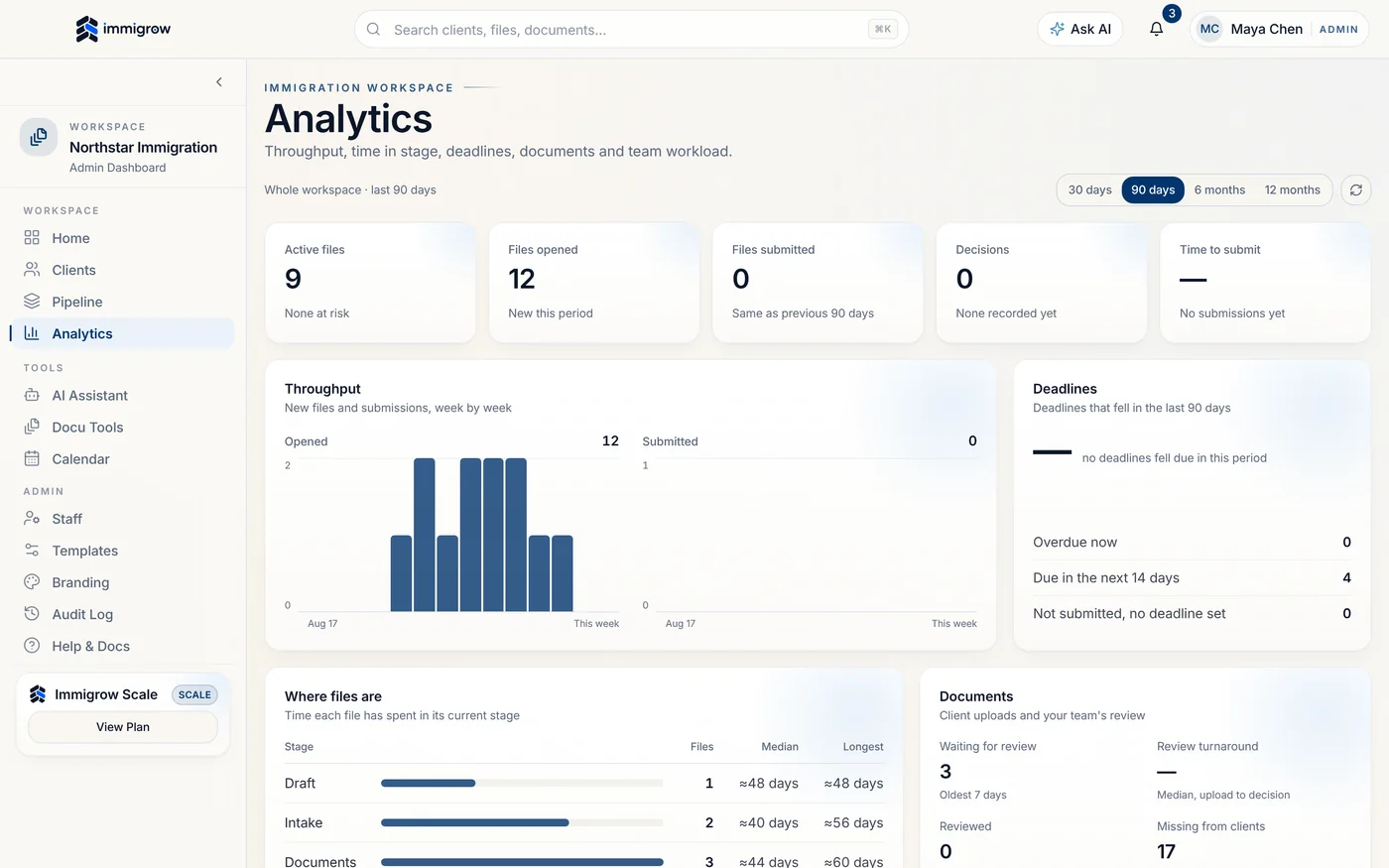
Analytics

Caseload, throughput and time in each stage, at a glance.

Immigrow analytics showing active files, throughput by week and time in stage

Your own application types

Build application types with their document checklists once. Reuse them on every new file.

Points calculators

Express Entry CRS and more, built in beside the file.

Branded emails

Invites, upload notices, status changes and reminders go out for you.

Full data export

Export your whole firm, documents and file history, as a ZIP any time.

PDF tools built in

Merge, split, compress and convert PDFs without leaving Immigrow. On every plan.

Your logo in the portal

Put your firm’s logo and labels on what clients see.

Scale plan

05 Trust and security

Your clients’ files, locked to your firm.

You are regulated, so we keep this plain. Here is exactly what Immigrow does today.

Walled off, firm by firm

Every firm’s data is separated from every other firm’s, enforced in the database itself on every table.

People see only what they should

Clients see only their own file. Staff see only what their role allows.

A full audit log

Who viewed or changed what, and when, on every file.

Nothing vanishes by accident

Archive has a 30-day undo. Permanent delete needs a typed confirmation.

Your records stay yours

Export the entire firm any time. If you cancel, you get 30 days read-only to export before anything is removed.

Payments by Stripe

Immigrow never stores card numbers.

Operated from British Columbia, Canada Google Calendar data is never sent to AI Privacy Policy

06 Pricing

Pricing in Canadian dollars, free for 7 days.

Starter

Solo consultants. A real taste of Immigrow.

C$103.99a month

Billed yearly at C$1,247.88

C$49.99a month C$129.99

Launch price for your first 3 months, new firms only

Choose Starter
  • 1 team member
  • 10 new client files a month
  • 25 GB storage
  • 1,000 AI messages a month

  • Client portal and guided intake
  • Document scanner, 25 documents a month
  • IRCC form autofill, 5 forms a month
  • AI assistant, CRS helper and AI Doc Maker
  • Google Calendar two-way sync
  • 5 custom application types

Pro

Most popular

Growing firms with staff. Run a team.

C$263.99a month

Billed yearly at C$3,167.88

C$329.99a month

Billed monthly

Choose Pro
  • Up to 10 team members, 2 managers
  • 25 new client files a month
  • 150 GB storage
  • 5,000 AI messages a month

  • Everything in Starter
  • Document scanner, 500 documents a month, plus Scan all
  • Unlimited IRCC form autofill, plus Autofill all
  • One-click client summary and next steps
  • Staff uploads on behalf of clients
  • 15 custom application types

Scale

Everything included

High-volume firms and agencies. The AI works for you.

C$399.99a month

Billed yearly at C$4,799.88

C$499.99a month

Billed monthly

Choose Scale
  • Up to 25 team members, 5 managers
  • Unlimited new client files (fair use)
  • 400 GB storage
  • 20,000 AI messages a month

  • Everything in Pro
  • Unlimited document scanning
  • Your logo and labels in the client portal
  • Priority support and an onboarding call
  • 40 custom application types
Coming soon on Scale AI agent with an approvals inbox · Daily AI briefing · Autopilot rules
All prices in Canadian dollars (CAD), plus applicable taxes. Every plan starts with a 7-day free trial. Cancel any time. Ask about founding-firm pricing

07 Questions

Straight answers.

Something else on your mind? Write to support@immigrow.ai.

Who is Immigrow for?

Regulated Canadian immigration consultants (RCICs) and immigration lawyers, from solo practices to firms with 25 staff.

How does the free trial work?

Every plan starts with a 7-day free trial. You add a card at checkout, you're not charged until the trial ends, and you can cancel any time before then.

How long does it take to learn?

Most of it in an afternoon. A short setup guide walks you through your first client file, and every screen uses plain, everyday labels.

Do my clients need to pay or download anything?

No. Clients get a free portal login by email invite and use it in any browser, on a phone or a computer.

Which IRCC forms can Immigrow fill?

Common IRCC PDF forms are filled from the client file, starting with IMM 5257, IMM 5710 and IMM 5476, with more added regularly.

Does the AI make decisions on my files?

No. The AI reads documents, drafts and suggests. Staff review and confirm every result before it's saved, and you stay responsible for the advice you give.

Is my client data safe?

Each firm’s data is isolated at the database level, clients see only their own file, and every action is logged. Client files are never pasted into a public consumer AI chat.

Can I get my data out?

Yes. Export your entire firm, documents and file history, as a ZIP any time.

What happens if I cancel?

Your workspace goes read-only for 30 days so you can export everything. Data is removed at day 60, with a reminder before.

Can I switch plans later?

Yes. Upgrade or downgrade any time from Billing. Limits on an upgrade apply right away.

Are prices in Canadian dollars?

Yes. All prices are in CAD, plus applicable taxes. Yearly billing is 20% off every plan.

How do I get support?

In-app support tickets on every plan. Scale includes priority support and an onboarding call.